An SEO and GEO report should answer three questions: which customer needs make your business visible, what do people do after discovering you, and which enquiries does that produce? Impressions, clicks and AI responses describe different stages. Reporting them separately helps you decide what to do next.
Start with the enquiries you want to receive
Define a useful enquiry for your business: the service required, area served, customer type and information needed for an initial conversation. A job application or sales pitch does not serve the same purpose as a quote request. Keep these categories separate in your tracking so that a busy form does not give a misleading picture of customer acquisition.
Give each enquiry an identifier, then record its status: received, qualified, appointment, quote or sale. The same contact may return through several channels. Your tracking should preserve that journey without counting three customers when there is only one person.
Read Search Console by topic and page
In Search Console, impressions record appearances in search results and clicks record interactions that lead to your website, according to the report's rules. Click-through rate compares clicks with impressions. Average position is an average of the available observations, rather than a fixed place your business occupies for every searcher.
Separate searches containing your brand from other queries, then group those other queries by service. Also examine the landing pages. The queries table may hide some searches for privacy reasons, so its total does not necessarily include all the clicks in the report.
For each group, compare periods of equal length and keep the same country, device and search-type filters. An overall increase may come from a new page, a news event or branded searches. Looking at pages and topics helps explain what is changing.

Identify the Google AI report being used
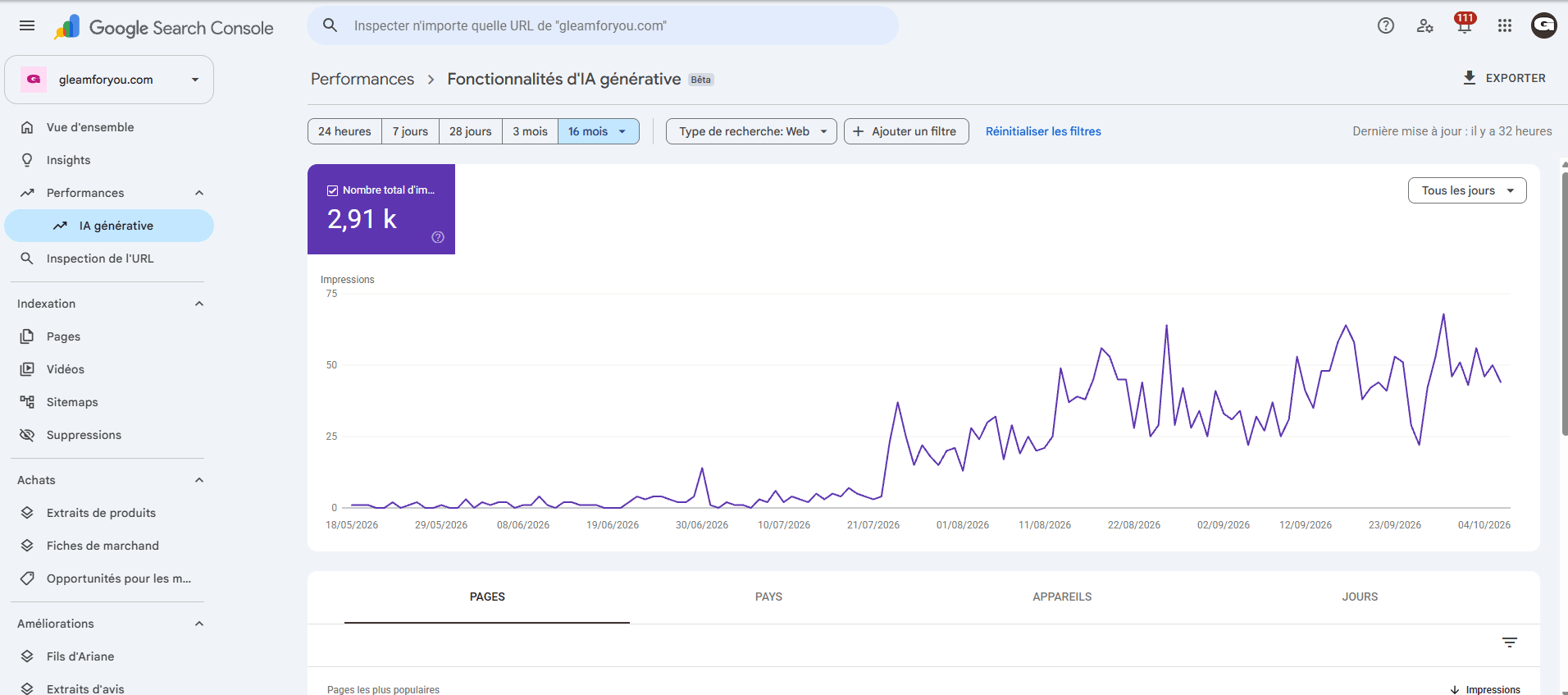
Google offers a Search Console report dedicated to impressions in generative AI features, including AI Overviews and AI Mode. Its official announcement states that the worldwide rollout was complete by 31 August 2026. The report lets you examine the pages, countries, devices and dates available for the property concerned.
This data describes Google. It does not measure a presence in ChatGPT or Perplexity. Include the report's name and filters in every export. Google also announced a multimodal search filter on 24 September 2026: comparisons need to retain the same scope to remain meaningful.
Keep the AI responses, not just a favourable screenshot
For AI assistants, start with a set of questions established before the comparison. Keep the exact question, date, product, search mode and complete response with its sources. A conversation that already contains explanations about your business does not reproduce discovery without prior context.
- Mention: the response names your business.
- Citation: it includes a source link; specify whether that source is your website or a third party.
- Recommendation: it suggests your business for the need expressed.
- Accuracy: the services, location and information presented match the facts.
These categories form our observation framework. Present results with their sample size. For example, three recommendations out of eight usable responses describe those eight responses. If two other attempts fail technically, record those failures separately. Repeating the same questions on several dates is more useful than retrying until you get the answer you want.
Connect visits with the enquiries received
Website analytics and sales tracking complement visibility data. Check the pages viewed, forms submitted and contacts actually recorded. A click on a call button does not prove a conversation took place; tracking should name exactly what it records.
Someone may read an AI response, search for your brand later and then call. Another visitor may decline tracking or copy a link. Keep an unknown-source category and, where useful, record the prospect's answer to ‘How did you hear about us?’ The report remains useful without artificially assigning every enquiry to a channel.
End the report with a decision
Keep a change log: the date, page, work completed and objective. If several changes went live together, assess them as a group first. On a new website, a few extra clicks can produce a large percentage increase; show the starting and ending numbers too.
Our SEO and GEO service defines the pages, tools and reporting schedule at the start. To make that planning easier, begin by preparing the information for your project. The report should help you choose your next steps and understand what your investment produces.
Sources and references
Frequently asked questions
01Does an AI citation prove that I have gained a customer?
No. It shows a presence in an observed response. Visits, enquiries and sales are measured using the available website analytics and sales tracking data.
02Why separate branded searches?
Someone already searching for your name knows your business. Separating those searches from service queries helps distinguish brand awareness from discovery, without assuming that every query is visible in Search Console.
03How often should I review results?
The schedule depends on the volume of data and the project. A monthly review helps connect actions with observations; technical incidents should be addressed as soon as they are detected. Comparisons should use consistent periods and filters.