A CRM project brief describes the information to track, the people using it and the actions to perform. It helps decide what the first version must do and compare quotes on the same scope. Start with a real customer file and its journey, before choosing dashboard colours.
Start with a deal, from first contact to the end of follow-up
Take a recent example, hiding confidential information. Where did the enquiry come from? Who received it? What information was missing before a reply could be sent? When did it move to a quote, an order, payment or follow-up? Note the tools used at each step and where information has to be copied across.
The aim is to make everyday work visible. ‘Having a complete CRM’ does not define a need. ‘Finding a customer's orders and knowing who should call them back’ already describes an action the team can test. Exceptions matter too: a rejected quote, a partial order, a change of contact or payment in instalments.
Define records and relationships
List the items the software needs to distinguish: customer company, contact, deal, quote, order, payment or service visit. One customer can have several contacts and deals. Putting them all in a single spreadsheet row creates ambiguities the new tool needs to resolve.
- For each record, state which information is essential and which remains optional.
- Specify who creates, checks and changes that information.
- Name statuses using the team's own words and define how an item moves between them.
- Decide how to recognise a duplicate and which identifier connects data across tools.
Describe the data you already have: files, approximate volume, columns and quality. A clean migration may require data cleaning and matching duplicates. This preparation belongs in the functional scope to be priced, just as the screens do.
Decide what each person can do
Define roles around real responsibilities. A salesperson may need their own deals, a manager the whole business, and someone handling invoicing the payment information. For each role, specify permissions to read, create, edit, delete and export.
Plan for team members joining and leaving, handing over their files and actions requiring approval. Flag sensitive data during scoping so access controls and technical choices can be adapted. A preparation document can use fictional examples rather than a complete customer export.

List integrations and responsibilities
For each tool to connect, record its name, intended use and the direction of the exchange. Does the website form create an enquiry? Does the store send an order? Does the invoicing software return a payment status? An available API does not mean every desired operation is permitted or covered by your subscription.
Specify what should happen if an exchange fails: retain the request, notify someone or allow manual recovery. Also identify the source of truth for each piece of information. If a customer address changes in two tools, the project needs to define which version wins.
Choose metrics and define them
A dashboard should help the team act. For each metric, write down its calculation and the decision it supports: deals without a next action, pending quotes, orders to process or payments received. The value of a sent quote, an approved order and a received payment represents different stages.
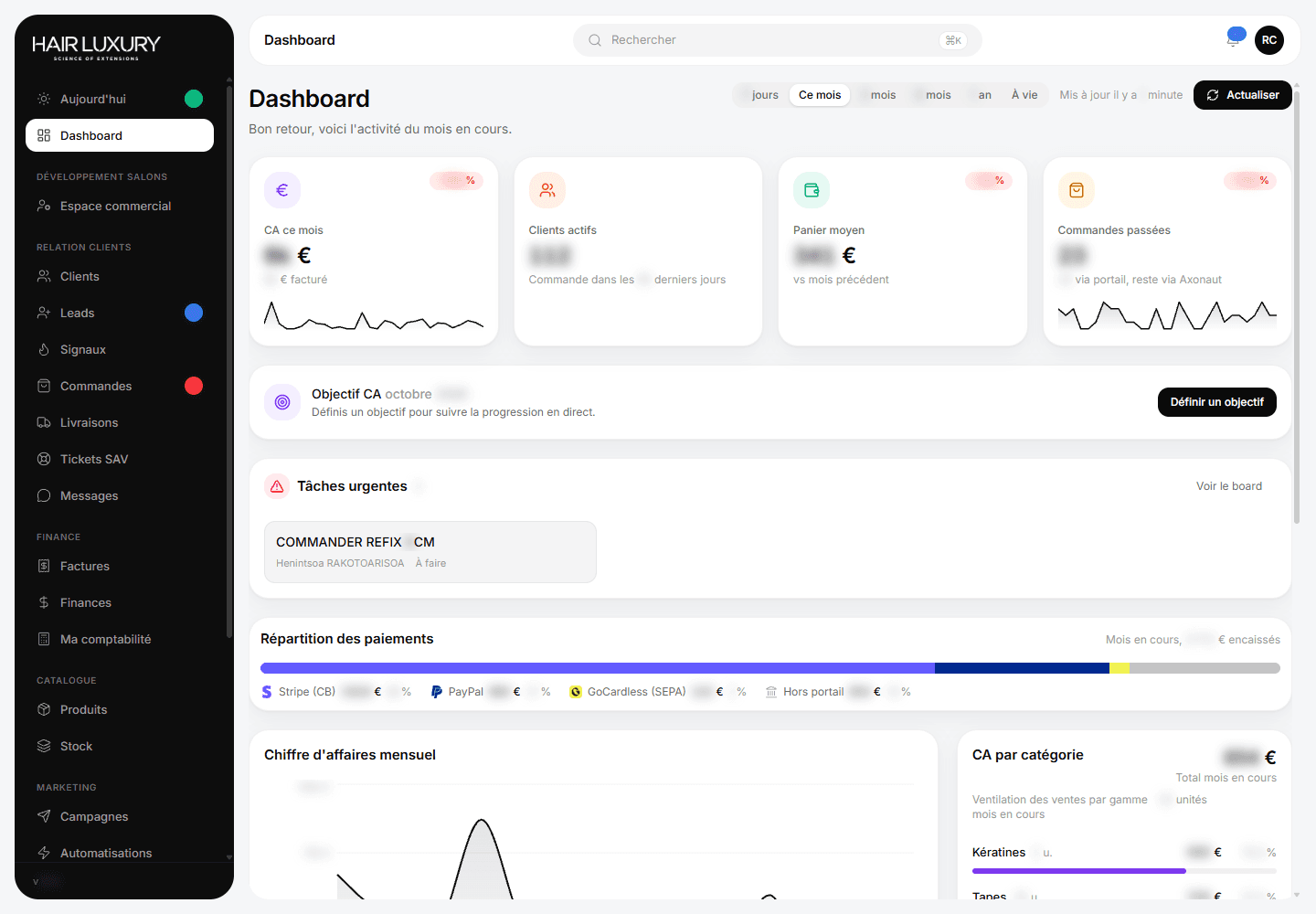
The Hair Luxury CRM presented by Klymax brings together customer, order, payment and sales activity tracking. The figures in its screenshot are blurred. This example shows how business work can be organised; the metrics in your tool are defined around your own processes.
Write acceptance scenarios before development
Acceptance testing checks that the software handles the agreed cases. Describe a few complete scenarios: create a contact, link a deal, change its status, find its history and check another user's permissions. Add an error or duplicate case to test recovery.
Separate the first version from later developments
Group features into those needed at launch, those that can wait and those still to explore. The quote should specify data migration, integrations, testing, onboarding and support after delivery. Hosting, maintenance and new features need a known owner and scope.
At Klymax, a bespoke CRM or business application starts at €6,900 excluding tax, with a schedule established after the quote. Prepare your current workflow, the tools to connect and your priority scenarios: together we can define a first version that supports your team's work.
Frequently asked questions
01Do I need a technical document to request a CRM quote?
No. A business workflow, a few example files and a list of existing tools are enough to start. Scoping then turns those needs into features, data, permissions and scenarios to validate.
02Are spreadsheets migrated automatically?
It depends on their structure and quality. Importing, handling duplicates and mapping columns must be defined in the project scope.
03How can I limit the first version's budget?
By choosing the essential workflows and postponing secondary features. Integrations and data migration need to be examined early because they can represent a substantial share of the work.